Sep | 05 | 2006

Knowing your WordPress theme

Posted by Professor as Blog Tutorial, Blogging Tools, Design and Themes

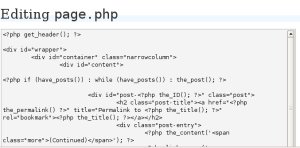
screenshot, wordpress theme editor

The beautiful thing about WordPress is that you more or less have a structured theme, sort of, so you have an idea that certain files will exist like the index.php, sidebar.php, header.php, footer.php, single.php, style.css, etc. These also correspond to the main parts of your WordPress theme so it’s really not difficult to manage.

Changing your sidebar theme file

The sidebar usually has the blogroll, the search box, the categories and the information about the blogger.
In most themes, the “About” section in the file sidebar.php would have some filler text like “Insert a little bit of author information here” so that gives you the cue that you edit that part of the sidebar file to make sure that you have something about you there, not some generic thing.

You could try putting the categories below the archives, if you have there a calendar or a list of months. You could also remove your blogroll and list of news feeds and place it on a separate page altogether, if you find that it is already very long. You could also add the little bit of code that you have to insert, especially if you want some WordPress plugins to work on your blog ;)

Template tags

You also have to learn a little bit something about the template tags that WordPress uses. You have div’s and ul’s and such with a bit of <?php templatetag(); ?> there. Those template tags will allow you to tweak how your blogroll will be like, or whatever element it is you want to change. And you don’t really have to be a geek to do that. You just have to like how to do it as you learn it.

Here is the reference for template tags. Codex page for Template Tags.

<?php the_author(); ?> is an example of a template tag. If you want to display author information (which is the name), use this tag. The one to be displayed is the “public” name of the author, which is in the profile.

More on template tags to follow!

[tags]blogging,blogs,wordpress,themes[/tags]

Related Articles

Comments are closed.

  
Our Features
  • Design and Themes

    Is Your Blog W3C Compliant?

    Last night I checked my personal blog’s code hoping I can proudly display the W3C Validated Button. Since I use Blogger and do not really do anything to clean up the code (beyond adding Alt-tags to the images I embed) I wasn’t surprised at all to find that my blog contained lots of errors - [...]

    Read on
    More Design and Themes Features
  • Software and Widgets

    Wordpress Plug-ins

    If you blog using Wordpress and can’t do something that you want done like adding Sphere-related content at the end of your blog posts you might be surprised to find out that there are already plug-ins available that make it happen.
    To find good Wordpress plug-ins all you need to do is search for “wordpress [...]

    Read on
    More Software and Widgets Features
  • Reviews

    A Friend In Need

    I’m helping out my friends from the UA&P - IShareHappiness Blog Team.
    Whenever you feel pessimistic, angry, troubled, frustrated, and depressed – what have you – you need someone to talk to. Someone who could help you be more optimistic and help make you feel that there is hope. Sometimes it’s hard to talk to someone [...]

    Read on
    More Blog Reviews
  • Monetization

    Making Money Through Consumer Generated Ads

    As I mentioned in my previous post today I will be suggesting some ways you can still profit by joining programs such as Pay Per Post and yet ensure that your readers don’t get turned off.
    In my opinion the only way to really do this is by making sure that your blog entries stay [...]

    Read on
    More Monetization Features
  • Marketing and Search Optimization

    Building your blog brand step by step

    Building your blog’s brand does not need to be difficult. However, when it comes to branding you should always remember to exert effort to be consistent with the image you wish to portray or you’ll end up with confused, turned-off, and/or skeptical readers. Branding inconsistencies will make it obvious that the image you’re putting up [...]

    Read on
    More Marketing and SEO Features
  • Blog Resources

    WordPress Themes Blog Hoster
    Performancing Metrics
Payu2blog

SUBSCRIBE

CATEGORIES

Sponsors

CONTRIBUTORS

RESOURCES

BLOG METRICS