Are Your Blog Visitors Too Lazy To Comment? Try ClickComments
Posted by Ia as Blogging Tools, Community BuildingBlogs are nothing without the communities surrounding them. Listing your blog in directories and other social sites, as well as linking and trackbacking to get noticed may be good and all, but without reader feedback in the form of comments, you’re essentially talking to the wind.
The good news is, it’s not always your fault. A lot of people find the process of commenting cumbersome: having to register, leave sensitive information (such as one’s email address), and come up with an original comment.
Jakob Nielsen analyzed audience participation and published his finding in a post called Participation Inequality. According to Jakob:
- 95% of readers dont contribute
- 5% contribute from time to time
- 0.1% participate a lot
Source: ClickComments Test Blog
PostReach attempts to make it easier for casual visitors to leave feedback on your blog posts with ClickComments. Once installed on your blog, your visitors can choose to leave a “comment” by clicking on one of the icons after the post.
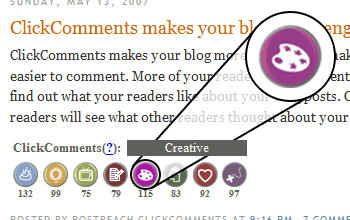
Each icon corresponds to a phrase that your readers can send more quickly compared to traditional commenting, e.g., “Cool Stuff”, “Inspired Me”, “Entertaining”, “Write More”, “Creative”, “Insightful”, “Touched My Heart”, “Great Find”.
Your readers can click on more than one icon. Statistics for each icon are updated almost instantly so you have a good idea of what others think of your post.
All of this happens without registration from users whatsoever. Of course the downside is not being able to tell which person clicked on what icon, but if your readers want themselves to be recognized, I think it’s better if they left a real comment.
PostReach assures us this commenting system is spam- and troll-proof. It also promises to promote blogs using ClickComments on their website (as any Web 2.0-minded company should!).
As of now, ClickComments supports Blogger, WordPress, and TypePad. Register on their website and you’ll receive instructions on how to install it. Take note that as a blog owner, you’re not required to enter your own email address either!
Visit ClickComments for more information, if at least for their really geeky video demonstration! A live example of ClickComments at work can be found on their test blog.
Related Articles
-
Design and Themes
Is Your Blog W3C Compliant?
Last night I checked my personal blog’s code hoping I can proudly display the W3C Validated Button. Since I use Blogger and do not really do anything to clean up the code (beyond adding Alt-tags to the images I embed) I wasn’t surprised at all to find that my blog contained lots of errors - [...]
Read on
More Design and Themes Features -
Software and Widgets
Wordpress Plug-ins
If you blog using Wordpress and can’t do something that you want done like adding Sphere-related content at the end of your blog posts you might be surprised to find out that there are already plug-ins available that make it happen.
Read on
To find good Wordpress plug-ins all you need to do is search for “wordpress [...]
More Software and Widgets Features -
Reviews
A Friend In Need
I’m helping out my friends from the UA&P - IShareHappiness Blog Team.
Read on
Whenever you feel pessimistic, angry, troubled, frustrated, and depressed – what have you – you need someone to talk to. Someone who could help you be more optimistic and help make you feel that there is hope. Sometimes it’s hard to talk to someone [...]
More Blog Reviews -
Monetization
Making Money Through Consumer Generated Ads
As I mentioned in my previous post today I will be suggesting some ways you can still profit by joining programs such as Pay Per Post and yet ensure that your readers don’t get turned off.
Read on
In my opinion the only way to really do this is by making sure that your blog entries stay [...]
More Monetization Features -
Marketing and Search Optimization
Building your blog brand step by step
Building your blog’s brand does not need to be difficult. However, when it comes to branding you should always remember to exert effort to be consistent with the image you wish to portray or you’ll end up with confused, turned-off, and/or skeptical readers. Branding inconsistencies will make it obvious that the image you’re putting up [...]
Read on
More Marketing and SEO Features
SUBSCRIBE
CATEGORIES
- Blog Tutorials News
- Design and Themes
- Featured Articles
- Marketing and Search Optimization
- Monetization
- Software and Widgets
- Writing

CONTRIBUTORS
RESOURCES


14 Responses
kabalweg
08|Jun|2007I think this is useful as many visitors really are lazy in commenting. I surely check this out. Thanks.
Ia Lucero
08|Jun|2007Welcome.
Geo
08|Jun|2007I installed ClickComments on my blog. Great stuff you found ia-chan!
Blogger Citizenship: 5 things you can do for you, and your community | J.T Dabbagian’s Blog
11|Jun|2007[...] cannot stress this enough. We all know the pain of hopping over to our blog, only to see nothing but a deserted “No Comme… A similar feeling goes for forums by bloggers. If you see a blog entry that you feel is [...]
Blogger Citizenship: 5 things you can do for you, and your community « J.T’s Productivity Blog
11|Jun|2007[...] cannot stress this enough. We all know the pain of hopping over to our blog, only to see nothing but a deserted “No Comme… A similar feeling goes for forums by bloggers. If you see a blog entry that you feel is [...]
Lorelle
11|Jun|2007Honestly, do you think by adding a confusing gimmick like this (I had no idea what I was looking at or the desire to click any of them since they don’t “mean” anything to me symbolically) will help encourage more comments?
I don’t see the evidence that this will do more except for the young group who will click anything brightly colored.
Can you convince me otherwise?
benj
12|Jun|2007This has got to be the bitchiest piece of code ever! It’s like telling your readers “I already know what you’re going to say…” It might even shame people into leaving comments.
Snarky! hehe.
Atheista | The Answer To Annoying Commenters?
15|Jun|2007[...] found out about this through a post made by Ia at Blog Tutorials. Bookmark at:StumbleUpon | Digg | Del.icio.us | Dzone | Newsvine | [...]
Fred
16|Jun|2007Nice Site ! Good job !
Chris
18|Jun|2007The percentages don’t surprise me at all. I have only had a blog running for a couple of months, and no-one has commented on it. It is one of the reasons that I have been so slow to actually make a blog in the first place……it is just so difficult to get feedback from people. The click-comments idea is interesting, but I don’t think it would have much appeal to older age-groups (who do actually read and create blogs, it’s not just all you young uns). I consider myself quite capable of writing a response, so I would never use a system like this. Maybe it’s another sign of lack of command of the English language?……..
Net Hustlin'
16|Jul|2007Great idea. Thanks for the tips. I’ve been having this problem for a while and this is very useful.
Invroz
03|Oct|2007Same problem here. Might be a good idea to test whether such an idea will encourage more people to give their feedbacks. Never mind about being too gimmicky or otherwise.
Invroz
http://www.aspire2inspire2.blogspot.com
DoorinifsHows
10|Jan|2008=”http://www.xrum.977mb.com”>new year foto
amituofo
19|Mar|2008The idea behind lazy comment is, well, commendable. But apart from spamming, this tool greatly reduces the interaction between the readers and the blogger which is why comment section exists in the first place.
With the tool, we just promote ‘laziness’ and discourage interaction.
Leave a reply